






RCSB PDB Help
Search and Browse > Advanced Search
Chemical Similarity Search
Introduction
The Chemical Similarity search allows you to find small molecules in the PDB archive that are similar to your query. These molecules are defined in the
Chemical Component Dictionary (CCD) and the
Biologically Interesting Molecule Reference Dictionary (BIRD). You can search using properties such as molecular formula or chemical descriptors.
You can use this search to find chemical components (for example, drugs, inhibitors, modified residues, or building blocks such as amino acids and nucleotides) that:
- are similar to the query formula or descriptor (e.g., differing by one or two atoms or functional groups),
- contain the query formula or descriptor as a substructure within a larger molecule, or
- exactly or very closely match the query formula or descriptor.
Documentation
You can access the Chemical Similarity search from the Chemical Search interface. This is the default form for chemical searches. In addition to defining similarity criteria, you can refine your query with text-based filters using metadata associated with small molecules by clicking the Chemical Attributes button.
How to Provide a Query
There are several ways to define a chemical query in the Chemical Similarity search.
Chemical Structure
You can enter either a SMILES or an InChI descriptor to define your chemical structure query
- SMILES (Simplified Molecular Input Line Entry Specification) are chemical notations that allow representation of chemical structures in a way that can be used by the computer. Beyond chemical element symbols, SMILES include a linear notation of molecular structure, including information about bond orders, ring structures, and stereochemistry. Note that SMILES generated by different software may be slightly different.
- InChI (International Chemical Identifier) is a standard textual identifier, developed by IUPAC (International Union of Pure and Applied Chemistry) and NIST (National Institute of Standards and Technology), to represent the chemical structure of molecules. This descriptor stores layers of information about the molecules atoms, bond connectivity, stereochemistry, charge etc.
Note: For the same chemical structure, results may differ depending on whether you use SMILES or InChI as the search input.
- SMILES is a simple, compact representation of the chemical structure. It encodes a chemical structure as a linear string of characters representing atoms and their connectivity. It does not standardize tautomers, resonance forms, or stereochemistry. It captures:
- Atom types
- Bond connectivity (single, double, triple)
- Ring closures
- Branching
- InChI is a standardized identifier that encodes more structural details, including:
- Atom connectivity and hydrogen placement
- Stereochemistry (chiral centers, cis/trans double bonds)
- Tautomers (standardized forms to reduce ambiguity)
- Isotopes, charges, and protonation states
- Standardization ensures that the same molecule always produces the same InChI
Using the standard InChI typically provides greater specificity, resulting in fewer but more precise matches. Depending on whether you want to see more matches (use SMILES) or more specific matches (use InChI), you can select the descriptor that best fits your search goals.
Note: The chemical similarity search descriptor is converted into one of the following a 2D representation for search:
- fingerprints are ordered sets of binary digits (bits) that encode specific physicochemical and/or structural properties of the molecule, such as the presence of common functional groups or ring systems.
- a graph where atoms and bonds in a molecule are mapped onto nodes and edges respectively. Information about atom connectivity, bond order etc. are also coded and used to compare/match different chemical structures.
Specify match type
When performing a chemical similarity or substructure search, you can choose the match type to control how closely results must resemble your query molecule. Different match types use varying levels of structural detail—such as atom types, bond orders, stereochemistry, and aromaticity—during the comparison. Selecting the appropriate match type allows you to balance search specificity and result breadth, depending on whether you want only highly similar molecules or a broader set of related compounds.
- Similar Ligands (Stereospecific) — in this option the atom type, formal charge, bond order, as well as atom and bond chirality are used as matching criteria. Graph matching is performed on the subset of molecules that satisfy a fingerprint prefilter or screening search. Results will include isomorphic and substructure matches within this screened subset.
- Similar Ligands (including Stereoisomers) — in this option the atom type, formal charge, and bond order are used as matching criteria. Graph matching is performed on the subset of molecules that satisfy a fingerprint prefilter or screening search. Results will include isomorphic and substructure matches within this screened subset.
- Similar Ligands (Quick Screen) — This option uses quick fingerprint matching. The Tanimoto coefficient is used to compute the degree of similarity between a pair of fingerprints. The Tanimoto coefficient has a range from 0 to 1 where higher values indicate greater similarity in structures. Results of Similar Ligands search include molecules with scores exceeding 0.6 for TREE type fingerprints or 0.9 for MACCS type fingerprints. Note that a Tanimoto coefficient of 1 does not indicate a perfect match.
- Substructure (Stereospecific) — in this option graph matching searches perform an exhaustive substructure search where atom type, formal charge, bond order, aromaticity, and atom/bond stereochemistry are used as matching criteria for the search type. Results may include ligands much larger than the query including BIRD molecules where the query molecule is part of the structure.
- Substructure (including Stereoisomers) — in this option graph matching searches perform an exhaustive substructure search where atom type, formal charge, bond order, and aromaticity are used as matching criteria for this search type. Results may include ligands much larger than the query including BIRD molecules where the query molecule is part of the structure.
- Exact match — in this option the atom type, formal charge, aromaticity, bond order, atom/bond stereochemistry, degree, ring membership, and hydrogen count are used as matching criteria for this search type. Results will include chemical components where the query and target graphs match exactly or are very similar. In some cases (especially with SMILES based searches) stereoisomers may also be included in the results.
Chemical Formula
A chemical formula presents the chemical symbols of elements and numbers representing their proportions in the molecule. The order of element symbols in the formula is not important. For example, the input "O1 C12 N4 H28" will match a chemical component with formula "C12 H28 N4 O". Other symbols such as parenthesis, charge indicators may also be included in chemical formulae. Note that a Chemical Formula Search is case-sensitive, so including an uppercase I in the formula "NIC4" will indicate (Nitrogen, Iodine, Carbon4) while a lowercase I indicates "NiC4" (Nickel, Carbon4).
Allow more elements than specified in formula
By default, the search will return chemical components whose formula exactly matches the query. If the Allow more elements than specified in formula option is selected, results will include chemicals that contain the required number of specified elements, but may also include additional elements.
For example, a search for C₂H₄ will also match C₂H₄O₃, since the specified elements are present even though the molecule contains extra atoms. This option is particularly useful when searching for chemical components that include a specific set of elements in a given ratio.
Chemical Component
The Chemical Component tab allows you to start a chemical structure query using an existing chemical component from the PDB archive.
The first step is to look up the component by its ID. These components are defined in the wwPDB Chemical Component Dictionary (CCD) and the Biologically Interesting Molecule Reference Dictionary (BIRD) and can be used as a template for your query molecule.
For example, the molecule ADENOSINE-5'-TRIPHOSPHATE is present in PDB structures and has the code ATP. By entering this code, you can pull the corresponding chemical structure from the database. The structure will then be loaded into the Chemical Structure input field, and the 2D chemical drawing will be displayed.
Once the structure is loaded, you can modify it as needed by either editing the descriptor input field or using the 2D chemical drawing tool.
2D Chemical Drawing
A 2D chemical drawing tool is integrated directly into the query builder UI, providing bi-directional visualization and editing capabilities. Changes made in the drawing tool are automatically reflected in the descriptor input field (SMILES or InChI), and updates to the descriptor are reflected in the drawing, allowing you to easily construct and refine your chemical query. The 2D chemical drawing displays atoms, connectivity, bond orders, and chirality where appropriate.
The drawing tool uses Marvin JS, a web-based chemical sketcher developed by ChemAxon, enabling you to quickly draw 2D chemical structures from scratch or visualize existing chemical descriptors.
Using the 2D Drawing Tool
- Draw your molecule of interest using the options available in the Marvin JS interface
- A built-in menu of chemical groups, chains, and rings, along with several keyboard shortcuts, provides quick access to common editing features. This makes it easy to draw even large or complex molecules
- This feature is particularly useful for novel ligands that are not present in the PDB archive
For more detailed instructions, refer to the following resources:
See Citation Policies for referencing 2D Chemical Drawing tool.
Search Results
Search results include all molecules that match your query, regardless of their location within a structure. This means results can include ligands, standard or non-standard residues, and other chemical components present in the structure.
Examples
Searching With Chemical Formula
- C12 H17 N4 O S: will match chemical components with formula "C12 H17 N4 O S"
- Ru2 with the Allow more elements than specified in formula option selected will match chemical components with a formula containing two rutheniums
Searching With Chemical Descriptors
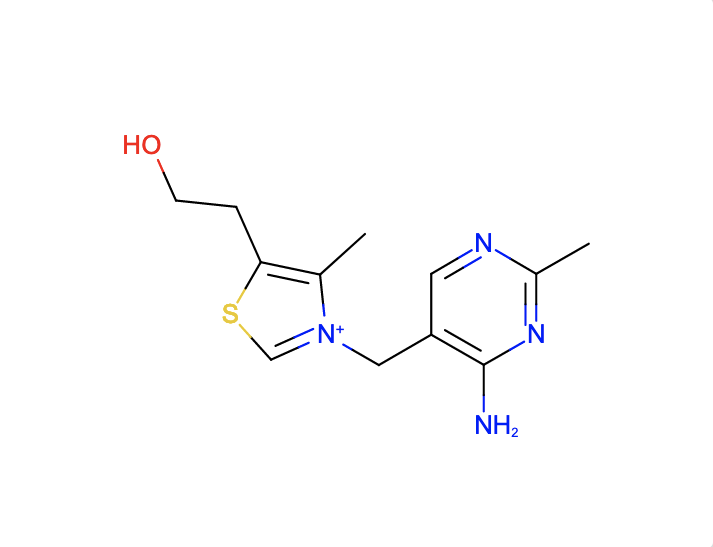
Find molecules similar to and with the substructure of the chemical component VIB
|
| Chemical component VIB |
The SMILES search with Cc1c(sc[n+]1Cc2cnc(nc2N)C)CCO and Match Type
- Similar Ligands (Quick screen) will match these chemical components
- Similar Ligands (Stereospecific) will match these chemical components
- Similar Ligands (including Stereoisomers) will match these chemical components
- Substructure (Stereospecific) will match these chemical components
- Substructure (including Stereoisomers) will match these chemical components
- Exact match will match these chemical components
Note that the query descriptor has no chiral atom so there is no difference in the results with the Match Types that are stereospecific and those that include stereoisomers.
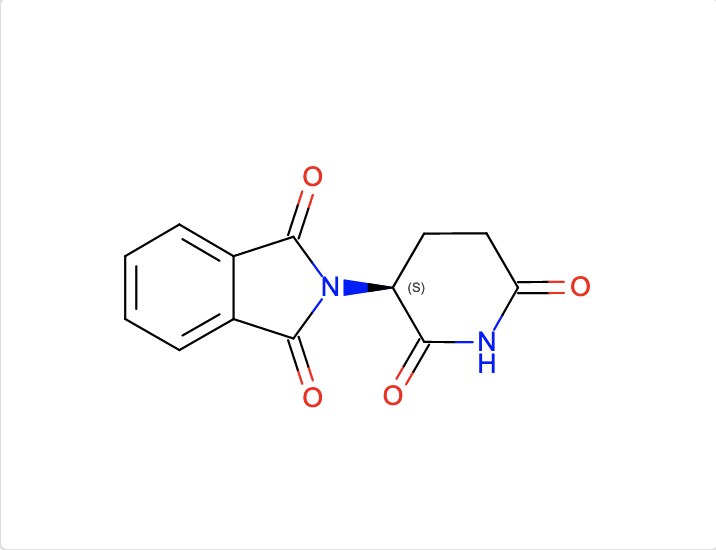
Find molecules similar to and with the substructure of the chemical component EF2
|
| Chemical component EF2 |
The InChI search with InChI=1S/C13H10N2O4/c16-10-6-5-9(11(17)14-10)15-12(18)7-3-1-2-4-8(7)13(15)19/h1-4,9H,5-6H2,(H,14,16,17)/t9-/m0/s1 and Match Type
- Similar Ligands (Quick screen) will match these chemical components
- Similar Ligands (Stereospecific) will match these chemical components
- Similar Ligands (including Stereoisomers) will match these chemical components
- Substructure (Stereospecific) will match these chemical components
- Substructure (including Stereoisomers) will match these chemical components
- Exact match will match these chemical components
Note that the query descriptor has one chiral atom so the results of the Match Types including and excluding stereoisomers yield different results.